

Teachers, Write on Behalf of Your Students
Help multiple students express themselves with seamspace's new author change feature. From kindergarten to eldercare support, now it's easier than ever.
Teachers, Write on Behalf of Your Students
Why This Matters
Do you ever need to help students write their thoughts and feelings? This is especially true for kindergarten teachers, special education support specialists, or caregivers helping seniors.
Many students want to express their emotions and experiences, but writing can be challenging due to age, language barriers, or physical limitations. seamspace understands this reality and wants to ensure that every student can share their heart and feelings—easily and naturally.
Introducing the Author Change Feature
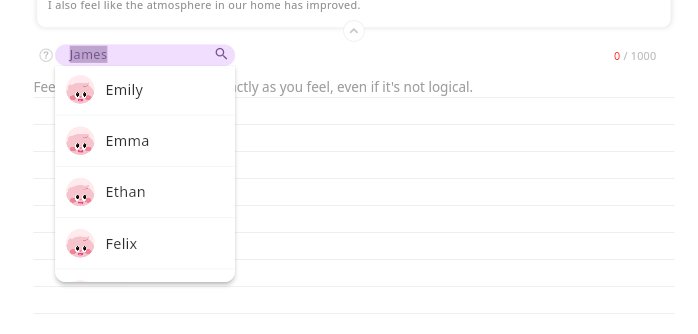
Now, while logged in as a teacher, you can change the author before writing. It’s as if you’re helping the student themselves compose their entry.
How to Use It
- Log in to seamspace as a teacher
- Before starting to write, select the student from the author selection screen
- Write the entry under that student’s name
- Voice input is also supported for even easier creation
With just one device, multiple students or seniors can now comfortably express themselves in writing.
Safe and Transparent Management
Every entry is only visible to the actual author when they log in. Even though you helped write it, the entry belongs to the student’s personal diary.
As a teacher, you can use the teacher dashboard to monitor all your students’ entries and provide meaningful feedback.
Growing Together with seamspace
seamspace’s AI emotional diary is dedicated to creating an environment where every child can express themselves and grow—regardless of physical ability or language proficiency. Every voice deserves to be heard and valued.
With this new feature, we believe teachers’ care and support will reach even further. Your dedication to helping students express themselves is what makes a real difference. 🤍